LI YAO'S BLOG

有趣的人生, 一半家长里短, 一半山川胡海

Hexo美化赞赏按钮样式

​ 要对赞赏按钮进行美化,首先需要找到赞赏功能的组件以及组件样式文件,以下是路径:

​ 组件路径:...\themes\next\layout\_partials\post\post-reward.swig

​ 组件样式路径:...\themes\next\source\css\_common\components\post\post-reward.styl

修改赞赏组件文件

​ 修改文件中的button按钮

1
2
3
4
5
6
7
8
9
10
11
12
13
14
15
16
17
18
19
20
21
22
<div class="reward-container">
<div>{{ page.reward_settings.comment }}</div>
<button onclick="var qr = document.getElementById('qr'); qr.style.display = (qr.style.display === 'none') ? 'block' : 'none';" style="cursor:pointer;">
<i class="fa fa-qrcode fa-2x" style="line-height:35px;font:normal normal normal 25px/1 FontAwesome;"></i>
</button>
<div id="qr" style="display: none;">

{%- for name, image in theme.reward %}
{%- set builtin = ['wechatpay', 'alipay', 'paypal', 'bitcoin'] %}
{%- if builtin.includes(name) %}
{%- set translation = __('reward.' + name) %}
{% else %}
{%- set translation = name %}
{%- endif %}
<div style="display: inline-block;">
<img src="{{ url_for(image) }}" alt="{{ author }} {{ translation }}">
<p>{{ translation }}</p>
</div>
{%- endfor %}

</div>
</div>

修改赞赏组件样式文件

1
2
3
4
5
6
7
8
9
10
11
12
13
14
15
16
17
18
19
20
21
22
23
24
.reward-container {
margin: 20px auto;
padding: 10px 0;
text-align: center;
width: 90%;

button {
border: 0;
border-radius: 40px;
cursor: pointer;
height: 40px;
width: 60px;
background: #e4303038;
transition: 0.2s ease-out;

&:hover {
border-radius: 5px;
background: #fff;
-webkit-box-shadow: 0 8px 16px 0 rgba(0,0,0,0.2), 0 6px 20px 0 rgba(0,0,0,0.19);
-moz-box-shadow: 0 8px 16px 0 rgba(0,0,0,0.2), 0 6px 20px 0 rgba(0,0,0,0.19);
box-shadow: 0 8px 16px 0 rgba(0,0,0,0.2), 0 6px 20px 0 rgba(0,0,0,0.19);
}
}
}

​ 根据自己的需求,可能用到的赞赏配置

1
2
3
4
5
reward_settings:
# If true, reward will be displayed in every article by default.
enable: true
animation: false
comment: 赞赏一杯咖啡

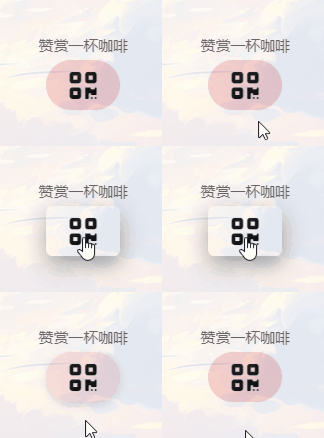
​ 以下是效果图

赞赏一杯咖啡